
Ask Google Pay AI: How Google’s New Assistant Helps Manage Expenses
Table of Contents
Toggle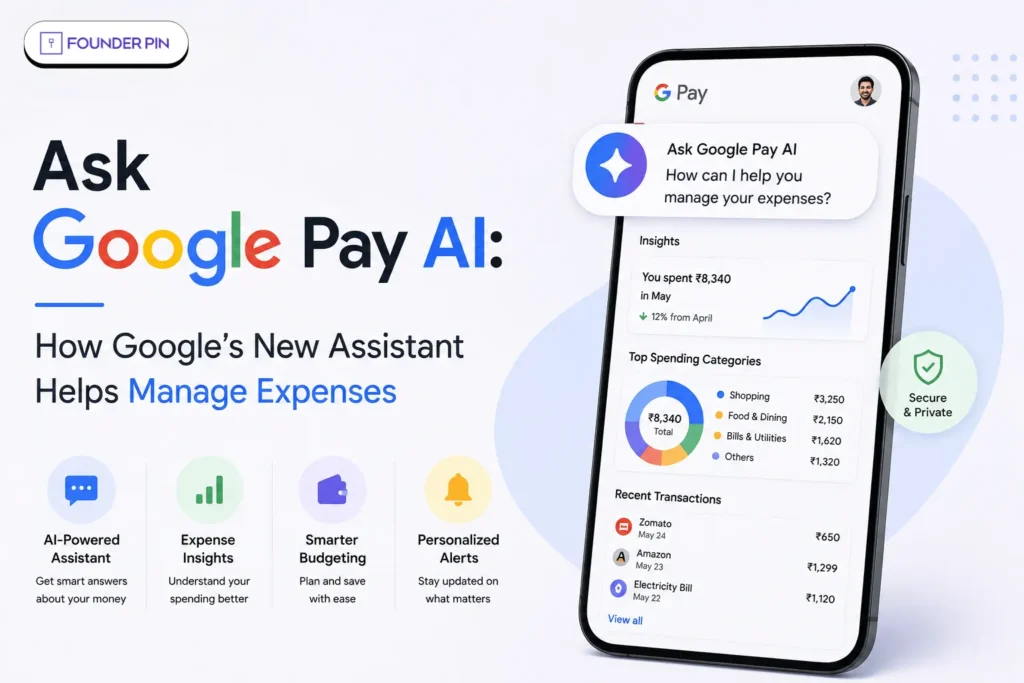
Managing money often sounds easier than it actually is. You know you spent money last week, but where did it go? Food? Shopping? Travel? Subscriptions? And why does the bank balance always seem to disagree with your memory?
Google is now trying to make those questions easier to answer with Ask Google Pay AI, a new conversational financial assistant built into Google Pay in India.
Powered by Google’s Gemini models, Ask Google Pay can analyze spending patterns, provide savings suggestions, explain financial concepts and surface personalized information. Google announced the feature on July 29, 2026, and says it is initially rolling out to a limited number of users in India.
Key Takeaways
- Ask Google Pay is a Gemini-powered AI feature built directly into Google Pay.
- It can analyze spending patterns, provide savings tips and explain financial concepts such as SIPs and CIBIL scores.
- Personalization uses information such as Google Pay transaction history and, with consent, CIBIL report data.
- The feature is currently available to a limited number of users in India.
- Ask Google Pay is an educational financial tool, not a registered financial adviser, and it cannot make payments for you.
What is Ask Google Pay AI?
Ask Google Pay is a conversational AI assistant built right into Google Pay, designed to help you actually make sense of your finances. Instead of digging through transaction after transaction manually, you can just ask a question about your spending and get an answer.
Google says the whole thing runs on its Gemini models, built to help people spot spending patterns, find ways to save, discover relevant offers, and pick up a few financial concepts along the way.
For founders and fintech businesses watching this shift, the launch is also a useful example of how AI is becoming part of everyday financial products. If you’re interested in how artificial intelligence is changing India’s startup ecosystem, you can also explore FounderPin’s guide to the Top Indian AI Companies in 2026.
Here’s what that looks like in practice — you could ask things like:
- “Analyse my spends from last week.”
- “How much did I spend on food?”
- “What are some ways I can save better?”
- “What is an SIP?”
- “Explain CIBIL score.”
- “What is the best card for my spending?”
- “Help me understand my recent spending.”
What’s genuinely interesting here is the conversational format itself. Rather than clicking through screen after screen, you just ask, get an answer, and keep going with follow-up questions naturally.
after screen, you just ask, get an answer, and keep going with follow-up questions naturally.
How does Ask Google Pay help manage expenses?
The main purpose of Ask Google Pay is to turn transaction data into understandable financial insights.
Google says users can chat with the assistant to understand their spending patterns and receive suggestions related to managing money.
This could make everyday expense tracking less tedious.
For instance, rather than scrolling through dozens of UPI transactions, a user could ask the assistant to analyze spending from the previous week.
The AI can then help organize the information into a more understandable picture.
For anyone building or running a startup, understanding where money goes is equally important on the business side. Founders interested in improving financial decision-making can also read FounderPin’s guide to startup unit economics and CAC analysis to understand how spending connects with business performance.
What can Ask Google Pay do?
According to Google’s official help documentation, the feature can help users:
- Understand spending patterns
- Get savings tips
- Explore personalized offers
- Learn about financial concepts
- Analyze transaction data
- Ask follow-up questions
- Compare financial information
- Understand topics such as SIPs and CIBIL scores
This makes Ask Google Pay less like a traditional expense tracker and more like a conversational financial information layer.
What information does Ask Google Pay AI use?
Ask Google Pay can use personalized financial information when the user enables personalization.
Google says the feature can use a user’s Google Pay transaction history and CIBIL report data to provide tailored suggestions. Users must consent to personalization for this experience.
Depending on the permissions and settings, relevant information can include:
- Past Google Pay transactions
- Saved payment methods
- Google Account information
- CIBIL report information
However, Google says highly sensitive identifiers such as complete card numbers, complete bank account numbers and government-issued financial IDs are excluded from AI interactions.
That distinction matters because financial AI needs access to useful information without turning every sensitive identifier into AI input.
What Can You Actually Ask Ask Google Pay AI?
You can ask Ask Google Pay AI direct, everyday questions about your spending, and it responds with a breakdown rather than a static chart. This is the feature’s core use case, and the one most users will reach for first.
Real example queries Google has cited include:
- “What was my largest spending last month?”
- “How can I cut back on my monthly expenses?”
- “How much did I spend on dining last week?”
- “Where did most of my money go this week?”
Rather than offering one-size-fits-all financial advice, the assistant reviews spending habits and provides recommendations based on the user’s actual expenses.
Can It Explain Financial Concepts Too?
Yes, Ask Google Pay AI is more than simply a cost tracker; it’s also a financial literacy tool. It can explain concepts in plain conversational language, without you needing to search for a definition elsewhere.
Topics it can walk you through include:
- Systematic Investment Plans (SIPs)
- Compound interest
- Credit scores and how they’re calculated
- The practical differences between India’s old and new tax regimes
It can also match spending patterns to relevant financial products — for instance, suggesting a suitable travel credit card if your transaction history shows frequent travel-related spending.
How to Access Ask Google pay Ai?
Exact steps to enable Ask Google Pay
1. Open the Google Pay app on your Android phone.
2. Tap “You”
Look at the bottom-right corner of the Google Pay home screen and tap You.
3. Open “Settings”
From the You page, tap Settings.
4. Go to “Privacy & Security”
5. Tap “Data and personalisation”
6. Find “Personalisation within Google Pay”
Turn Personalisation within Google Pay → ON.
This is the key switch. Google Pay keeps this turned off by default, and enabling it is required for Ask Google Pay.
Then where is the actual Ask Google Pay button?
After enabling personalisation:
Google Pay Home → Money → “Ask a question”
More specifically:
Home screen → Money (bottom of screen) → Ask About your finances → Ask a question
Tap Ask a question, and the Ask Google Pay AI chat interface should open.
In short
You → Settings → Privacy & Security → Data and personalisation → Personalisation within Google Pay → ON
Then:
Money → Ask About your finances → Ask a question
You can then type or speak questions such as “Analyse my spending last month” or “How much did I spend on food last week?” Ask Google Pay can analyse eligible Google Pay transaction data and provide financial insights.
If you’re interested in how startups can use AI to build better customer experiences, FounderPin’s guide to agentic AI for founders is another useful resource to explore.
If you still don’t see “Ask a question”
Don’t worry—it doesn’t necessarily mean you’ve done something wrong. As of August 2026, Google is rolling Ask Google Pay out in phases to a limited number of users in India. So even if Personalisation within Google Pay is enabled, the Ask Google Pay section may not yet be available on your account.
Also, simply updating the app cannot guarantee access if Google’s server-side rollout hasn’t reached your account.
How does Google protect financial data?
Google says Ask Google Pay keeps financial data within the Google Pay ecosystem and does not use it to train Google’s AI models.
The company says users’ financial data and interactions are not shared with third-party applications. Google also says the data is handled under its Google Pay Terms of Service and Privacy Policy.
Google also states that:
- Data is not used to train Google’s AI models.
- Financial information is not shared with third-party apps.
- Sensitive identifiers are excluded from AI interactions.
- Personalization can be controlled by the user.
- Some data may undergo human review for quality evaluation, with personal and sensitive information redacted.
- AI interactions and feedback may be used for product improvement under privacy-preserving controls.
For a financial AI product, those safeguards are just as important as the chatbot itself.
What are the limitations of Ask Google Pay AI?
Ask Google Pay is useful, but users should not treat every AI response as automatically correct.
Google itself warns that AI can make errors.
There are several practical limitations to remember:
- Availability is still limited.
- Personalization must be enabled.
- AI responses may contain mistakes.
- It is not a registered financial adviser.
- It cannot execute payments.
- It cannot provide specific investment recommendations.
- Users should not enter passwords, PINs or complete account numbers.
- Financial decisions still require independent judgment.
This last point is especially important.
A confident AI answer is still an AI answer.
Final Verdict: Is Ask Google Pay AI Worth Paying Attention To?
Yes. Ask Google Pay is a promising step toward conversational personal finance in India.
Its key advantage is combining AI with personalized Google Pay financial data, helping users understand spending, discover savings opportunities and learn about financial concepts more easily.
However, it is not a financial adviser or investment manager. For everyday money management, though, it could make personal finance much simpler and more accessible.
The development also shows how quickly AI is moving beyond generic chatbots and into products people already use every day. For founders tracking this transition, FounderPin’s coverage of AI startups and emerging technology companies offers more context on where the Indian technology ecosystem is heading.
Building a fintech product or thinking about how AI fits into your own customer experience? Contact FounderPin today for a consultation, and let’s map out the right path for your startup.
Frequently Asked Questions
What is Ask Google Pay AI?
Ask Google Pay is a Gemini-powered conversational AI feature built into Google Pay that helps users analyze spending patterns and understand financial topics.
Is Ask Google Pay available in India?
Yes, but Google currently says it is available to a limited number of users in India as the feature rolls out.
Does Ask Google Pay cost extra?
Google’s official announcement and help documentation describe Ask Google Pay as a feature within Google Pay; they do not list a separate subscription fee for using it.
Can Ask Google Pay give investment advice?
No. Google says it provides educational financial information and is not a registered financial adviser.
Does Ask Google Pay have access to my bank account?
Google says the feature can use Google Pay transaction information and, where consented, CIBIL report data. It also says highly sensitive identifiers such as complete bank account and card numbers are excluded from AI interactions
SHARE